Overview
I developed a Chrome extension that evaluates LinkedIn job postings against saved resume context and job-fit preferences. It adds a side panel directly into the browsing workflow, analyzes the current posting, and returns a fit score, recommendation, strengths, risks, and a short rationale in a format designed to be easy to scan.
The goal was to reduce the friction of repeatedly reading long job descriptions and manually mapping them against experience, target roles, skill requirements, and practical constraints like remote preference. Rather than replacing judgment, the tool acts as a structured first-pass filter.
What it does
- Analyzes the current LinkedIn job posting
- Compares the posting against stored resume text and job-fit preferences
- Returns a recommendation and fit score
- Highlights why the role looks strong
- Surfaces risks or gaps that may affect whether to apply
- Supports configurable preferences, including target roles, skill priorities, keywords, locations, remote-only preference, and additional notes
My role
Product framing, workflow design, preference modeling, prompt shaping, and recommendation UX
Technical approach
The extension is built around three main ideas.
In-context analysis
The extension runs alongside an active LinkedIn job page and presents results in a side panel instead of a disconnected pop-up. Keeping the analysis in context makes it easier to compare the output against the original posting while browsing.
Preference-driven evaluation
Instead of generating a generic summary, the extension uses a structured preference model to guide evaluation. Inputs include resume text, target roles, required skills, preferred and avoided keywords, location preferences, remote-only settings, and optional notes. This makes the output more personalized than simple keyword overlap.
LLM-backed reasoning with structured output
Claude is used to evaluate the posting against the stored criteria and return structured output: recommendation, score, company snapshot, rationale, and risks or gaps. A large part of the implementation was shaping the response into something concise, readable, and useful in practice.
Challenges and tradeoffs
Balancing usefulness and trust
The hardest part was not calling a model, but shaping the output so it felt understandable and inspectable. The UI separates strengths from gaps, so the recommendation is easier to evaluate than a single score alone.
Keeping the workflow lightweight
A job-search tool needs to be fast and low-friction. The side panel was designed to feel like part of the browsing flow rather than a separate application, which shaped the information hierarchy and short bullet-based rationale.
Privacy and local control
Because the tool handles resume content and search preferences, I kept the configuration centered around local settings and explicit user input. The UI also makes clear that the API key is not saved.
Screenshots
In-context analysis view
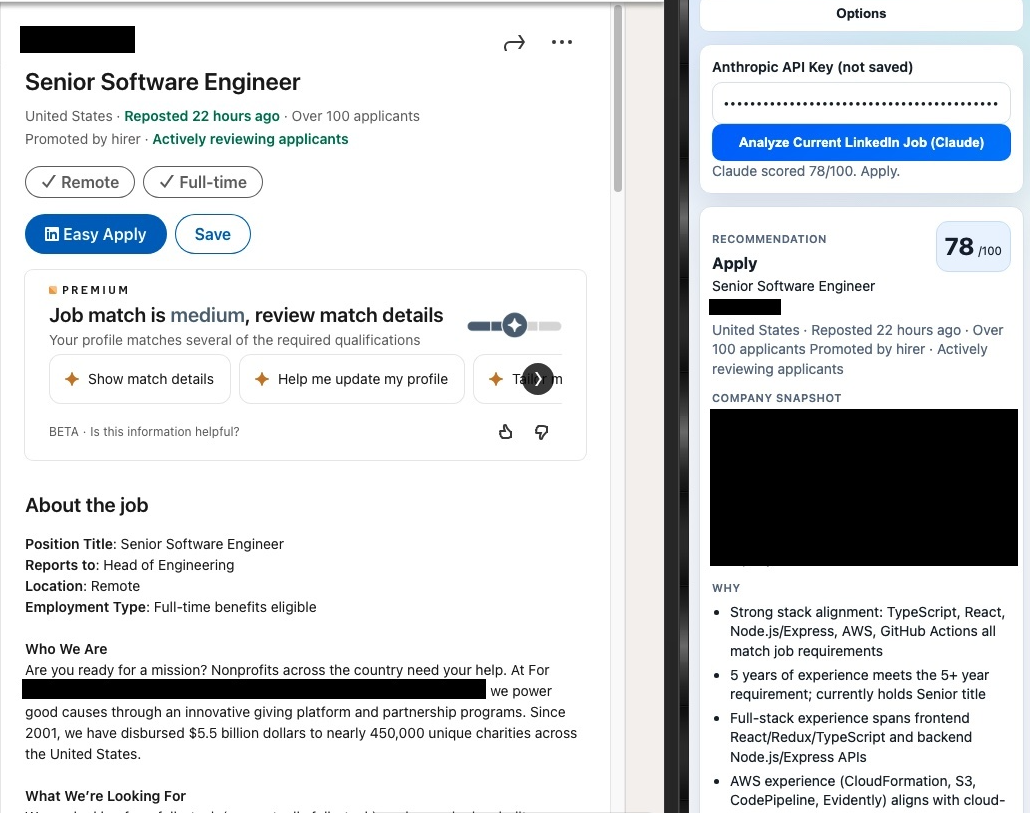
LinkedIn job page with the extension side panel showing in-context analysis.
Recommendation detail view
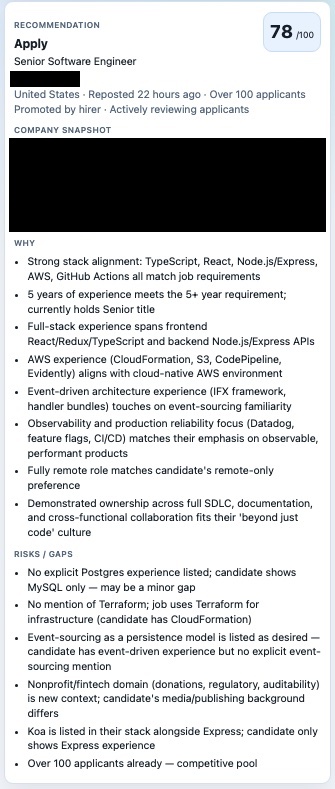
Recommendation view with score, rationale, and risks/gaps.
Preferences and settings view
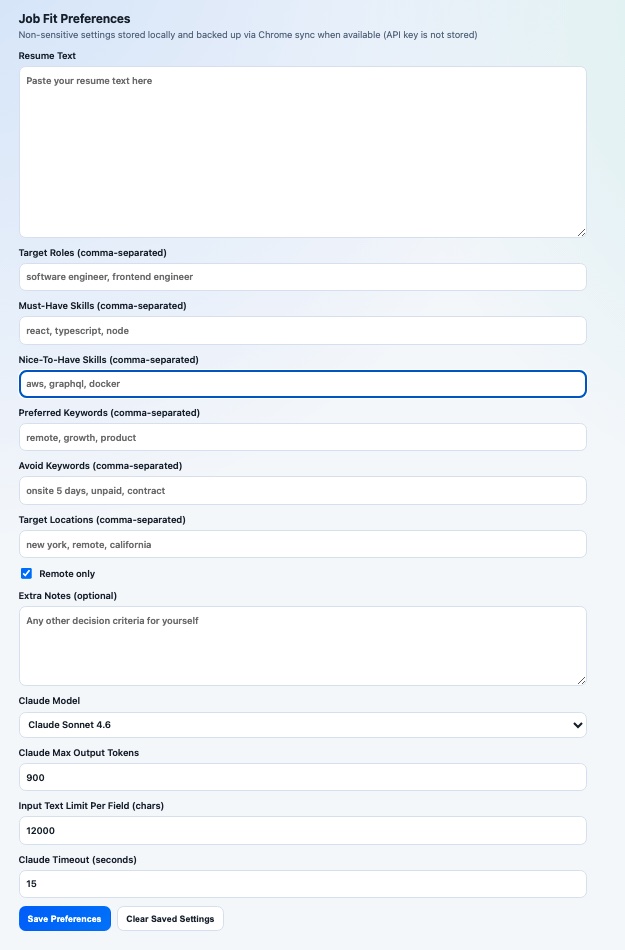
Preference model for resume input, target roles, skills, keywords, locations, and model settings.
Next
Improve job-post parsing, tighten the side-panel hierarchy, and add saved analysis history for comparing roles over time.